Portrait, full body
Film in portrait with the player filling at least a third of the frame height, and keep the whole body and racket in shot. Match the camera angle of the reference you picked.
TABLE TENNIS MATCH REVIEW
A useful table tennis review has two steps. Go through the match rally by rally and find the points you keep losing. Then film that stroke in practice and put it next to a reference, or next to an older video of yourself. Duolian does both in one app.
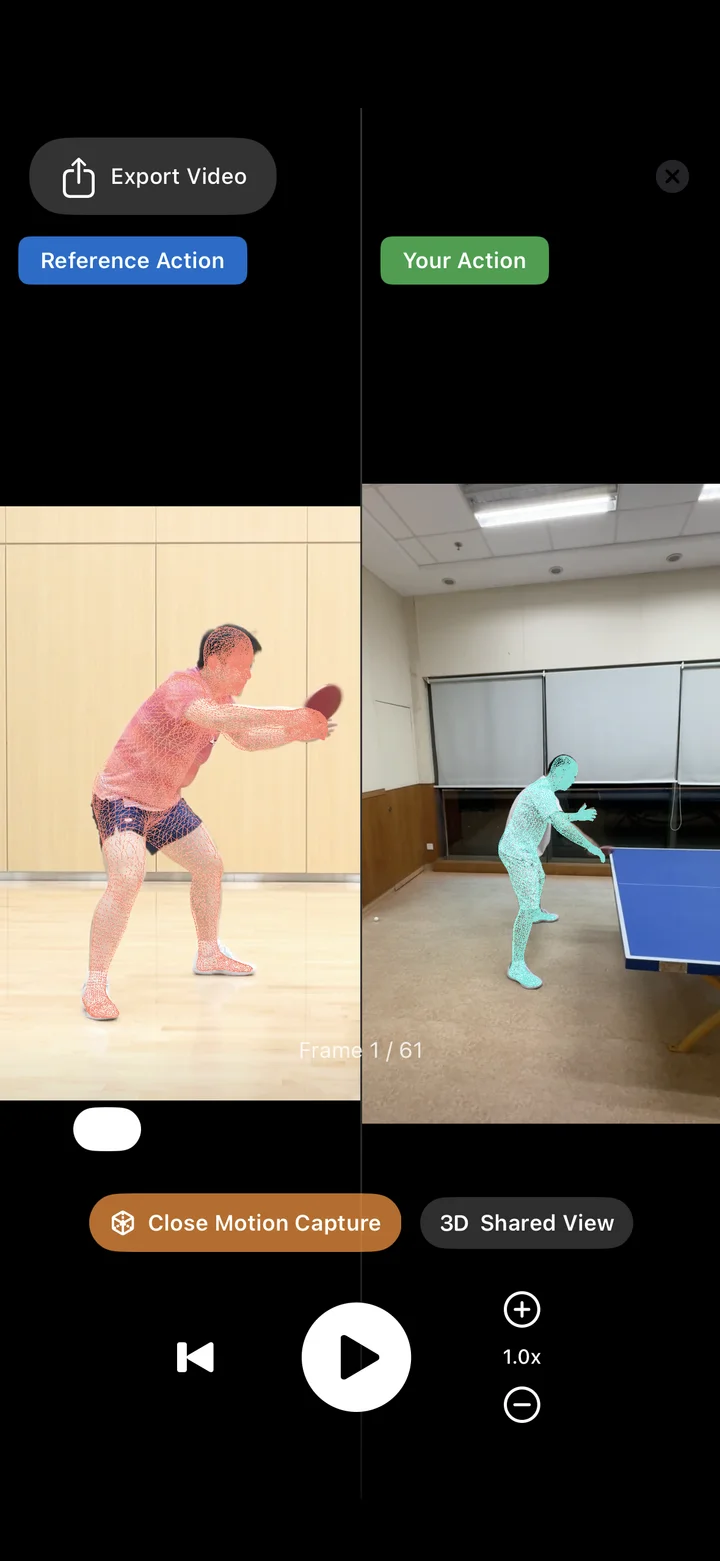
TABLE TENNIS MATCH REVIEW
Start with the rallies. Import the match and Duolian cuts it into rallies, grouped into games and matches. Work through them point by point, favourite the ones worth a second look, or save a rally to Photos and send it to your coach or practice partner.
Then move to the stroke. Say your forehand loop against backspin keeps finding the net. Film a few of them in practice and compare them with a reference. Duolian lines up the timing of the two videos, so you can step frame by frame, slow it down and turn on the skeleton overlay.
Table tennis references currently cover the forehand and backhand loop, each against backspin and against topspin, plus the backhand flick from the forehand side; the app always shows what is available. When no reference fits, Custom Comparison puts two of your own videos side by side, such as the same stroke this week and last month.
For another angle, send a reference comparison to the cloud for 3D motion capture. Both bodies appear in one shared 3D view that you can rotate and step through. It needs a connection and uses one 3D comparison.
REVIEW WORKFLOW
These come from the Recording Tips in the app. The cleaner the clip, the more the comparison tells you.
Film in portrait with the player filling at least a third of the frame height, and keep the whole body and racket in shot. Match the camera angle of the reference you picked.
Record at 60 fps and play 3 to 5 of the same stroke in a row.
Trim the video to your best stroke, 3 seconds at most, then import it into Duolian to compare.
FAQ
Right now: the forehand loop against backspin and against topspin, the backhand loop against backspin and against topspin, and the backhand flick from the forehand side. Other strokes are listed in the app but not open yet. Custom Comparison works with any two videos of your own.
No. Table tennis comparison is visual: side by side, frame by frame, slowed down, with a skeleton overlay. You or your coach judge the difference.
It puts the reference and your stroke in one 3D view that you can rotate, so you can step through body position and how power is generated. It runs in the cloud and needs a connection. Premium includes 16 a month, and every account can try one for free.
Yes. Save a single rally to Photos, or merge several into one video, then share it from the iOS share sheet. Saved videos carry a Duolian watermark.
Duolian also has table tennis ball-machine training: pick a single drill, adjust the settings, or combine drills and durations into a practice plan. It requires compatible ball-machine hardware.
The Web app has table tennis rally splitting and playback, plus reference comparisons and cloud 3D comparison. Custom Comparison of two of your own videos is only in the iOS app for now.
INTERNAL LINKS